|
Getting your Trinity Audio player ready...
|
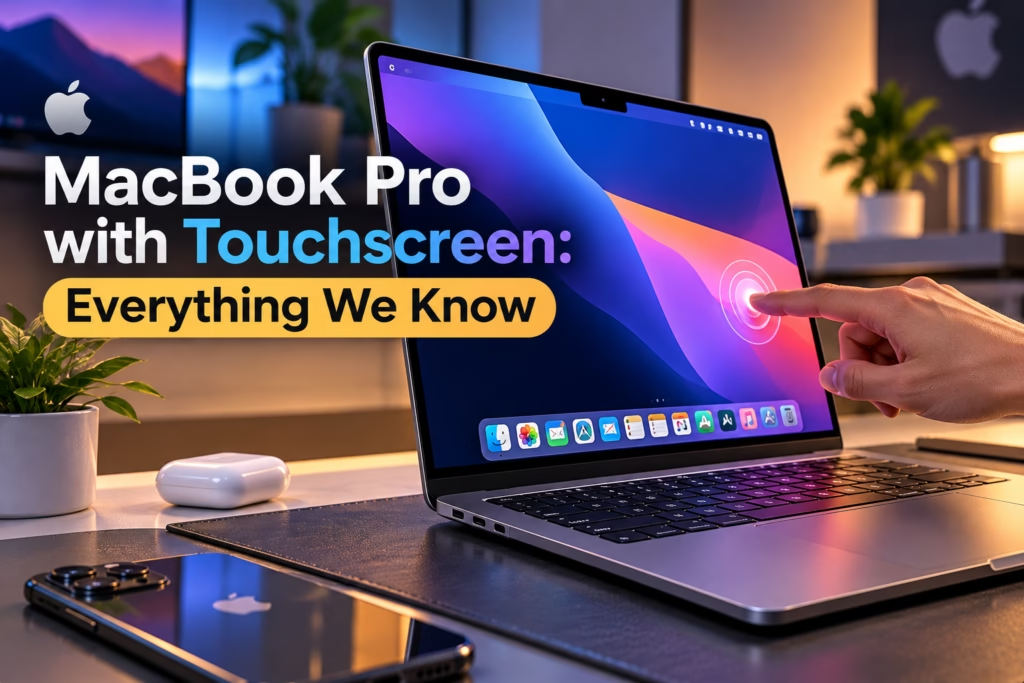
Apple has finally brought touchscreen technology to the MacBook Pro, marking a major change in the company’s approach to professional laptops. For years, Apple maintained that the MacBook’s keyboard and trackpad offered the best way to interact with macOS. However, the introduction of the new touchscreen MacBook Pro brings a different experience, combining traditional laptop productivity with direct touch-based interaction.
The new MacBook Pro with PROLED XDR Display introduces a tandem OLED touchscreen, a redesigned and lighter body, Apple’s M5 Pro and M5 Max processors, and new software features designed specifically for touch input. The device is aimed at professionals, creative users, developers, and anyone who wants a more flexible way to interact with their laptop.
Apple announced the touchscreen MacBook Pro on October 28, 2026. Pre-orders have started, and the laptop is scheduled to become available on November 6, 2026.
But what makes this MacBook different from previous models? How does its touchscreen work? What are its expected features, specifications, and price in India?
Let’s explore everything you need to know about Apple’s touchscreen MacBook Pro.
Apple Touchscreen MacBook Pro: What’s New?
The touchscreen MacBook Pro represents a significant evolution in Apple’s laptop design. Instead of simply adding a touch-sensitive layer to an existing display, Apple has introduced a new display technology and redesigned several aspects of the laptop.
The most important changes include:
- A tandem OLED touchscreen called PROLED XDR.
- Direct touch interaction with macOS.
- A thinner and lighter design.
- Improved brightness, contrast, and colour reproduction.
- A redesigned hinge for better stability during touch interactions.
- New touch-focused features in macOS 27.
- Dynamic Island integration on the Mac.
- M5 Pro and M5 Max processors.
- Support for professional creative workflows involving touch input.
Apple’s new touchscreen experience is designed to complement the keyboard and trackpad rather than replace them. Users can continue working with traditional Mac controls while using their fingers for tasks such as scrolling, zooming, selecting, and manipulating objects on the display.
Why Is Apple Introducing a Touchscreen MacBook Pro?
Apple has traditionally taken a different approach to touchscreen laptops compared with many Windows manufacturers.
For years, companies such as Microsoft, Dell, HP, and Lenovo have offered laptops with touchscreen displays. Some of these devices also feature convertible designs that allow users to fold the display into a tablet-like configuration.
Apple, however, has focused on maintaining a clear distinction between the MacBook and iPad product categories.
The MacBook has been designed primarily for keyboard-based productivity, while the iPad has focused on touch interaction and Apple Pencil support.
This distinction is now evolving.
The touchscreen MacBook Pro introduces direct interaction without abandoning the traditional laptop experience. Users can still type, navigate with the trackpad, connect external displays, and run professional macOS applications.
At the same time, touch input opens new possibilities for creative professionals.
Graphic designers can interact directly with their artwork. Video editors can manipulate clips on the timeline. Musicians can play software instruments on the display. Developers can test touch-enabled applications directly on their Mac.
The change is particularly important because modern users are already accustomed to interacting with smartphones and tablets through touch.
Apple’s new approach brings that familiarity to the MacBook Pro while maintaining its professional capabilities.
Touchscreen MacBook Pro Display: Tandem OLED Technology
One of the biggest highlights of the new MacBook Pro is its PROLED XDR display.
Apple has introduced tandem OLED technology, which uses two self-emitting pixel layers to improve brightness, contrast, and display performance.
Unlike traditional LCD displays, OLED technology allows individual pixels to produce their own light. This enables deeper blacks, improved contrast, and more precise control over the image.
The tandem OLED configuration takes this technology further by using two layers to improve brightness and maintain consistent image quality.
Apple says the new display offers several major advantages.
Better Brightness and Contrast
The PROLED XDR display delivers up to 2,000 nits of peak brightness and a contrast ratio of 10,000,000:1.
This means users can experience brighter highlights, deeper blacks, and improved detail in high-dynamic-range content.
For photographers, video editors, and colourists, these improvements can make a significant difference when working with professional content.
Improved Colour Accuracy
Apple has also introduced support for wider colour gamuts, including P3 and Adobe RGB.
This is particularly useful for professionals working in photography, video production, digital design, and print-related workflows.
The wider colour range allows the display to reproduce more colours, helping creative professionals work with greater visual precision.
Reduced Reflections
Apple has introduced improvements designed to reduce internal reflections commonly associated with OLED displays.
A nano-texture display option is also available to help reduce glare in bright environments.
This can be useful for professionals who work in offices, studios, outdoor locations, or spaces with strong lighting.
120Hz Variable Refresh Rate
The new touchscreen MacBook Pro supports a 120Hz variable refresh rate.
A higher refresh rate makes scrolling, animations, and touch interactions feel smoother. It can also improve the experience when working with fast-moving visual content.
For users who frequently interact with the display, this can make the laptop feel more responsive.
How Does the Touchscreen Work on MacBook Pro?
Apple’s touchscreen MacBook Pro is designed to provide a natural interaction experience.
The touch sensor is integrated directly into the display panel rather than being layered on top of it. Apple says this approach reduces latency and makes the interaction feel more direct.
Users can perform common actions such as:
- Swipe to scroll through webpages and documents.
- Pinch to zoom into photos and designs.
- Tap to select objects and interface elements.
- Drag and drop items across applications.
- Double-tap windows to expand them.
- Use touch gestures to arrange windows.
- Interact directly with creative content.
The touchscreen works alongside the existing keyboard shortcuts, trackpad gestures, and other macOS controls.
This means users do not need to change their entire workflow to benefit from the new display.
For example, a video editor can continue using keyboard shortcuts for precise editing while using touch to move clips, zoom into a timeline, or select content.
Similarly, a designer can use the trackpad for navigation and touch input for manipulating objects directly on the screen.
macOS 27: Software Designed for Touch
Hardware alone cannot create a good touchscreen experience. The operating system must also support touch interaction effectively.
Apple has introduced touch-focused features in macOS 27, designed to make the new MacBook Pro easier to use with fingers.
The operating system supports touch interactions across system applications and provides APIs that developers can use to create touch-friendly experiences.
Existing applications can also benefit from Apple’s ability to translate touch input into familiar macOS interactions.
This is important because users will not need every application to be completely redesigned before they can begin using the touchscreen.
Apple’s own applications are receiving additional touch-focused improvements.
Touchscreen Features in Final Cut Pro
Video editors can use touch input to interact directly with the editing timeline.
Possible workflows include selecting clips, moving footage, adjusting timelines, and zooming into specific sections of a project.
These interactions could make certain editing tasks faster, particularly when working with visual content.
Touchscreen Features in Logic Pro
Musicians can interact with software instruments directly on the display.
Apple has introduced a Multi-Touch polyphonic keyboard, along with tappable chord and drum pads.
This could make the MacBook Pro more useful for musicians who want to experiment with musical ideas without relying entirely on external MIDI controllers.
Touchscreen Features in Pixelmator Pro
Creative professionals can use the touchscreen to draw, paint, select objects, and manipulate designs directly on the canvas.
The larger display area provides more room for interaction compared with a trackpad.
For designers, this could make certain creative tasks feel more natural.
Touchscreen Features for Developers
Developers can use the touchscreen MacBook Pro to test how touch-enabled applications behave on macOS.
Apple has also introduced updated system gesture APIs, allowing developers to create applications with more intuitive touch controls.
This could become particularly useful for developers working on applications that support multiple Apple platforms.
Dynamic Island Comes to MacBook Pro
Another notable addition is Dynamic Island integration.
Previously associated with Apple’s iPhone lineup, Dynamic Island now provides an interactive interface for certain system activities on the MacBook Pro.
It can display information related to Spotlight, Live Activities, and Siri AI.
Users can interact with certain activities directly, including controlling music, handling calls, and viewing timely information.
The feature creates a more interactive experience without requiring users to open separate applications for every action.
However, Dynamic Island should not be confused with Face ID. Apple continues to use Touch ID for secure authentication on the MacBook Pro.
MacBook Pro Touchscreen Design and Build
Apple has redesigned the MacBook Pro to make it thinner and lighter while maintaining its professional performance.
The new design retains the familiar MacBook Pro appearance, including its keyboard, trackpad, and premium aluminium construction.
However, the updated display technology allows Apple to reduce the thickness of the laptop.
The new 14-inch MacBook Pro weighs approximately 3 pounds, while the 16-inch model weighs around 4 pounds.
This makes the new models more portable than their predecessors.
Apple has also introduced a redesigned hinge that provides greater stability during touchscreen interactions.
This is an important consideration because touching the display can create movement in a traditional laptop hinge.
The updated design aims to make the touchscreen experience more comfortable while maintaining the stability expected from a professional laptop.
The new MacBook Pro is available in 14-inch and 16-inch configurations, giving users the option to choose between portability and a larger workspace.
MacBook Pro with Touchscreen Specifications
The new touchscreen MacBook Pro combines Apple’s latest professional processors with an advanced OLED display and updated connectivity.
| Feature | MacBook Pro with PROLED XDR |
|---|---|
| Display technology | Tandem OLED touchscreen |
| Display sizes | 14.2-inch and 16.3-inch |
| Peak brightness | Up to 2,000 nits |
| Refresh rate | 120Hz variable refresh rate |
| Processor | Apple M5 Pro / M5 Max |
| Operating system | macOS 27 |
| Unified memory | Up to 128GB |
| Storage | Up to 16TB |
| Camera | 12MP Center Stage |
| Authentication | Touch ID |
| Wireless connectivity | Wi-Fi 7, Bluetooth 6 |
| Ports | Thunderbolt 5, HDMI, SDXC, MagSafe, headphone jack |
| External display support | Up to 3 displays with M5 Pro; up to 4 with M5 Max |
| Battery life | Up to 24 hours |
| Touchscreen support | Yes |
The specifications make it clear that Apple is positioning the touchscreen MacBook Pro as a professional laptop rather than a conventional touchscreen notebook.
It combines the benefits of direct touch interaction with the processing power and connectivity required for demanding workflows.
MacBook Pro Touchscreen Price in India
Apple has positioned the touchscreen MacBook Pro as a premium product.
The new touchscreen models carry a higher starting price than equivalent non-touchscreen MacBook Pro configurations.
The official US starting prices are:
| Model | Starting Price in the US |
|---|---|
| 14-inch M5 Pro | $2,899 |
| 16-inch M5 Pro | $3,399 |
| 14-inch M5 Max | $4,499 |
| 16-inch M5 Max | $4,799 |
The final price in India will depend on Apple’s official Indian pricing, configuration options, taxes, and any additional costs associated with the touchscreen display.
Indian buyers should check Apple’s official India website or authorised retailers for the confirmed rupee price.
The touchscreen MacBook Pro is expected to appeal primarily to professionals who need a combination of performance, display quality, and direct touch interaction.
For users who mainly browse the internet, watch videos, or perform everyday office work, a standard MacBook Air or non-touchscreen MacBook Pro may offer better value.
MacBook Pro Touchscreen Launch Date
Apple announced the touchscreen MacBook Pro on October 28, 2026.
The launch schedule is:
- Announcement date: October 28, 2026.
- Pre-orders: October 28, 2026.
- Availability begins: November 6, 2026.
The initial rollout includes selected markets, with availability through Apple Stores and authorised retailers.
Indian customers should confirm local availability and delivery timelines through Apple’s official channels.
MacBook Pro with Touchscreen vs Traditional MacBook Pro
The touchscreen MacBook Pro introduces a different way to interact with the laptop, but it does not completely replace the traditional MacBook experience.
| Feature | Traditional MacBook Pro | Touchscreen MacBook Pro |
|---|---|---|
| Display technology | Existing MacBook display | Tandem OLED PROLED XDR |
| Touch input | No | Yes |
| Keyboard | Yes | Yes |
| Trackpad | Yes | Yes |
| Touch-based creative workflows | Limited | Supported |
| Display brightness | Varies by model | Up to 2,000 nits |
| Touch-focused macOS features | No | Yes |
| Target audience | Professionals and everyday users | Professionals and creative users |
The touchscreen model is particularly useful for people who frequently interact with visual content.
However, users who rely heavily on keyboard shortcuts, external displays, and traditional desktop workflows may not find touch input essential.
The value of the touchscreen depends on how frequently it improves the user’s everyday tasks.
Is the Touchscreen MacBook Pro Better Than a Windows Touchscreen Laptop?
Windows laptops have offered touchscreen functionality for years.
Devices from manufacturers such as Dell, HP, Lenovo, and Microsoft provide touch input across several price categories.
Some Windows laptops also support convertible designs, allowing users to switch between laptop and tablet modes.
Apple’s touchscreen MacBook Pro takes a different approach.
Instead of transforming into a tablet, it retains the traditional MacBook design and adds touch functionality to the display.
The main advantage is the integration between Apple’s hardware, macOS, and professional applications.
The tandem OLED display, Apple silicon processors, and touch-focused software are designed to work together.
However, Windows laptops may offer greater flexibility in terms of convertible designs, touchscreen options, and price ranges.
The better choice depends on the user’s requirements.
For someone who needs macOS applications and professional creative workflows, the touchscreen MacBook Pro could be a compelling option.
For someone who wants a budget-friendly touchscreen laptop or a device that can function as a tablet, a Windows convertible may offer better value.
Who Should Buy the Touchscreen MacBook Pro?
The touchscreen MacBook Pro is not designed for every laptop user.
Its biggest advantages are likely to be experienced by people who regularly interact with visual content.
Graphic Designers
Graphic designers can use touch input to interact directly with artwork, select objects, and manipulate designs.
The combination of a high-quality OLED display and direct interaction could improve certain creative workflows.
Video Editors
Video editors can benefit from touch-based timeline interactions, clip selection, and zooming.
However, professional editing still requires precision, and keyboard shortcuts will remain important.
Musicians
Musicians can use the touchscreen to interact with software instruments and virtual controls.
This could be especially useful for composing music, experimenting with sounds, and working with MIDI-based applications.
Developers
Developers can use the touchscreen MacBook Pro to test touch-enabled applications and explore new interaction models.
The updated gesture APIs may also encourage developers to create more touch-friendly macOS applications.
Business Professionals
Business professionals can use touch input for presentations, document navigation, and everyday tasks.
However, the additional cost may not be justified for users who primarily work with spreadsheets, emails, and browser-based applications.
FAQs
Does the MacBook Pro have a touchscreen?
Yes. Apple introduced its first touchscreen MacBook Pro on October 28, 2026. The new MacBook Pro with PROLED XDR Display features a tandem OLED touchscreen and touch-focused macOS 27 features.
What is the touchscreen MacBook Pro called?
Apple officially calls the new model the MacBook Pro with PROLED XDR Display. The name refers to its advanced tandem OLED display technology.
What is the MacBook Pro touchscreen launch date?
Apple announced the touchscreen MacBook Pro on October 28, 2026. Pre-orders began on the same date, and availability is scheduled to begin on November 6, 2026.
What is the expected price of the touchscreen MacBook Pro in India?
The official US starting price is $2,899 for the 14-inch M5 Pro model. The Indian price depends on Apple’s official local pricing and configuration options.
Does the touchscreen MacBook Pro support Apple Pencil?
Apple has introduced direct touch interaction on the MacBook Pro, but this does not automatically mean that Apple Pencil support is available. Buyers should check the official specifications for supported input accessories.
Is the touchscreen MacBook Pro better than the MacBook Air?
The touchscreen MacBook Pro is designed for professional workflows involving advanced display technology, higher processing performance, and touch-based creative applications. The MacBook Air remains a more affordable choice for everyday productivity, students, and general users.
Should you buy the touchscreen MacBook Pro?
The touchscreen MacBook Pro is worth considering if you regularly work with creative applications, visual content, or workflows that benefit from direct touch interaction.
However, users who primarily type, browse the internet, or work with spreadsheets may not need the additional touchscreen features.
The best choice depends on your budget, professional requirements, and how frequently you expect to use the touchscreen.